Case study · Consumer banking

A savings app that stopped blind applicants at step 1.

Myntly: Savings account sign-up and dashboard (web, demo). Audited against WCAG 2.2 AA on 26 October 2026.

  • 12 issues
  • 2 blockers
  • 4 high
  • Does not conform

Demo audit. Myntly is a fictional company. We built the site to copy patterns we often see on real Danish sites, then audited it the way we audit client work. Screen reader results are predicted from the accessibility tree and will be confirmed with NVDA and VoiceOver.

The brief

Why this site, and why it matters.

A blind applicant cannot get past step 1, and no keyboard user can finish step 2. For a bank-like service that is a clear EAA risk and lost sign-ups. The top five fixes are about 3 developer days and also remove friction for every user (CAPTCHA, blocked paste).

Consumer banking services are in EAA scope, and Danish fintechs are typically small product teams that already run automated checks in CI. Sign-up is where they lose customers, and it is full of patterns WCAG 2.2 added rules for: CAPTCHAs, blocked paste, repeated fields and help placement. The MitID hand-off itself is third-party; we tested the provider's own screens around it.

Consumer banking services, including the websites and apps used to open and manage accounts, are covered by the EAA (Article 2(2)(d)) and the Danish Accessibility Act. Banking also carries extra requirements for identification and security methods to be perceivable and operable.

Sector
Consumer banking: fintech savings app
Scope
8 templates and states, 2 journeys
Standard
WCAG 2.2 AA, mapped to EN 301 549
Result
Does not conform

Journeys

Could a person get through?

We ran each journey start to finish by keyboard and at 400% zoom. Screen reader results are predicted until we confirm them with NVDA and VoiceOver.

  • Open a savings account

    Landing → e-mail and password → about you → MitID hand-off

    Keyboard
    Blocked
    Screen reader predicted
    Blocked
    400% zoom
    Completed
    Outcome
    Blocked

    MY-002 savings amount can't be chosen; MY-001 CAPTCHA has no non-visual alternative

  • Change the monthly savings rule

    Dashboard → “Skift regel” dialog → save

    Keyboard
    Completed with difficulty
    Screen reader predicted
    Completed with difficulty
    400% zoom
    Completed with difficulty
    Outcome
    Completed with difficulty

    MY-004 dialog doesn't take focus; MY-010 “saved” not announced

The automated scan

What axe-core saw.

Of the 12 issues, 2 are fully detected by axe-core and 1 partly. axe flagged the CAPTCHA's missing alt text, but adding alt text would not fix it: the CAPTCHA itself is the barrier.

12 issues found by testing by hand

2 fully flagged by axe-core

1 partly flagged

0/2 blockers fully flagged

Key findings

The barriers that stop people.

Every finding in a Doorwide report has the same parts: where it is, who it affects, how to reproduce it and a code-level fix. Effort runs S, M, L.

MY-001 · Sign-up step 1

Image CAPTCHA blocks blind and low-vision applicants

Blocker Effort M Partly flagged by axe 1.1.13.3.8

Who it affects
Blind and low-vision users, people with dyslexia or cognitive disabilities
What happens
Step 1 asks the user to type five distorted characters from an image. The image has no alt text, there is no audio or other alternative, and the refresh link is named “↻”. A screen reader user can't continue. Even if alt text were added, it would give away the answer, so the CAPTCHA has to go.
Fix
Remove the CAPTCHA. Use server-side rate limiting, a honeypot field and an invisible risk score (such as Cloudflare Turnstile in non-interactive mode). MitID already verifies identity in step 3.
<!-- remove the .cap block -->
<input type="text" name="website" class="hp" tabindex="-1" autocomplete="off" aria-hidden="true">
/* .hp { position:absolute; left:-9999px; } */
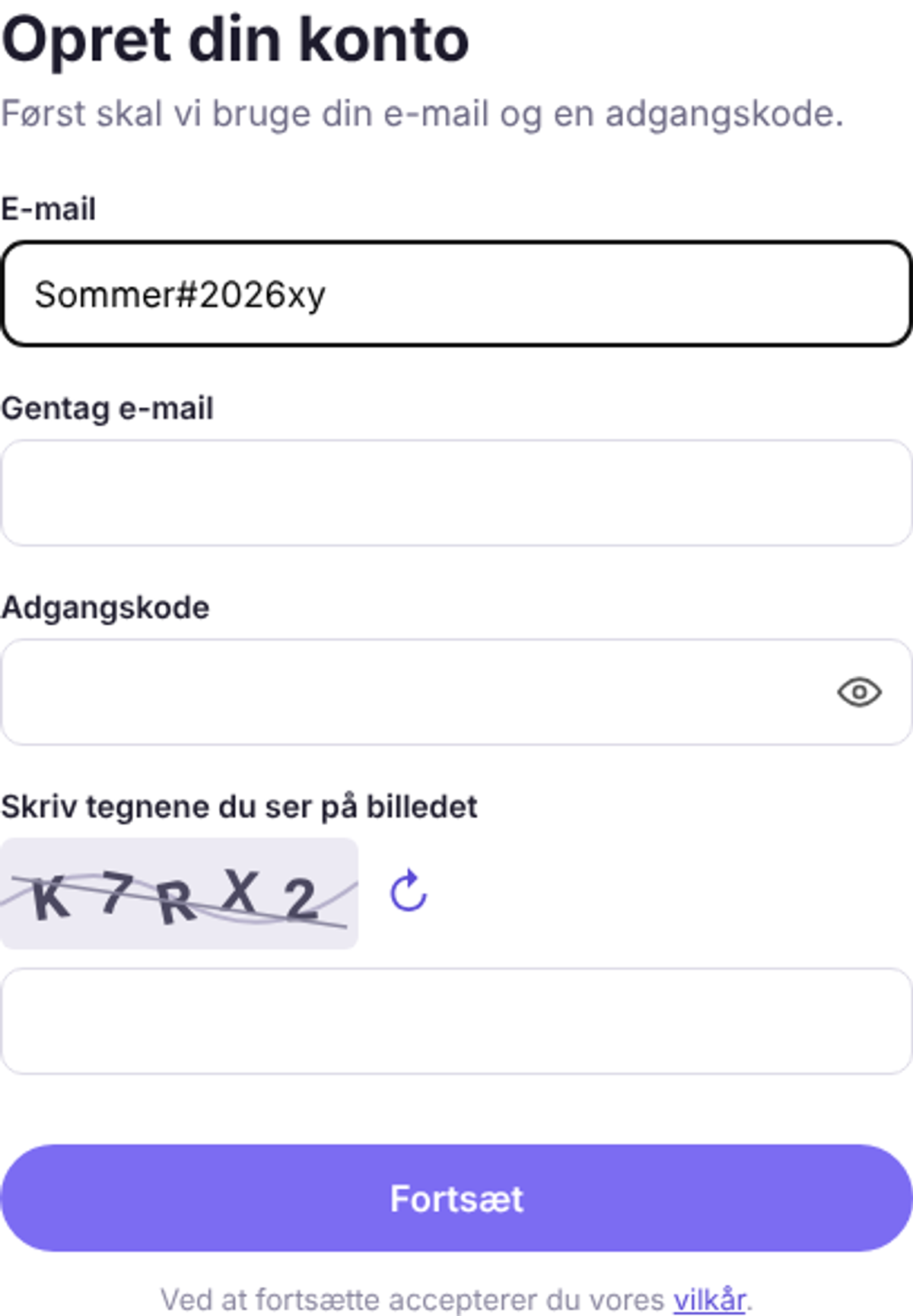
Sign-up step 1 with e-mail, repeat e-mail, password and an image CAPTCHA showing distorted characters above a text field.
Evidence for MY-001

MY-002 · Sign-up step 2, “Forventet månedlig opsparing”

Savings amount can't be chosen without a mouse

Blocker Effort S Not flagged by axe 2.1.14.1.21.3.1

Who it affects
Keyboard, screen reader, switch and voice control users
What happens
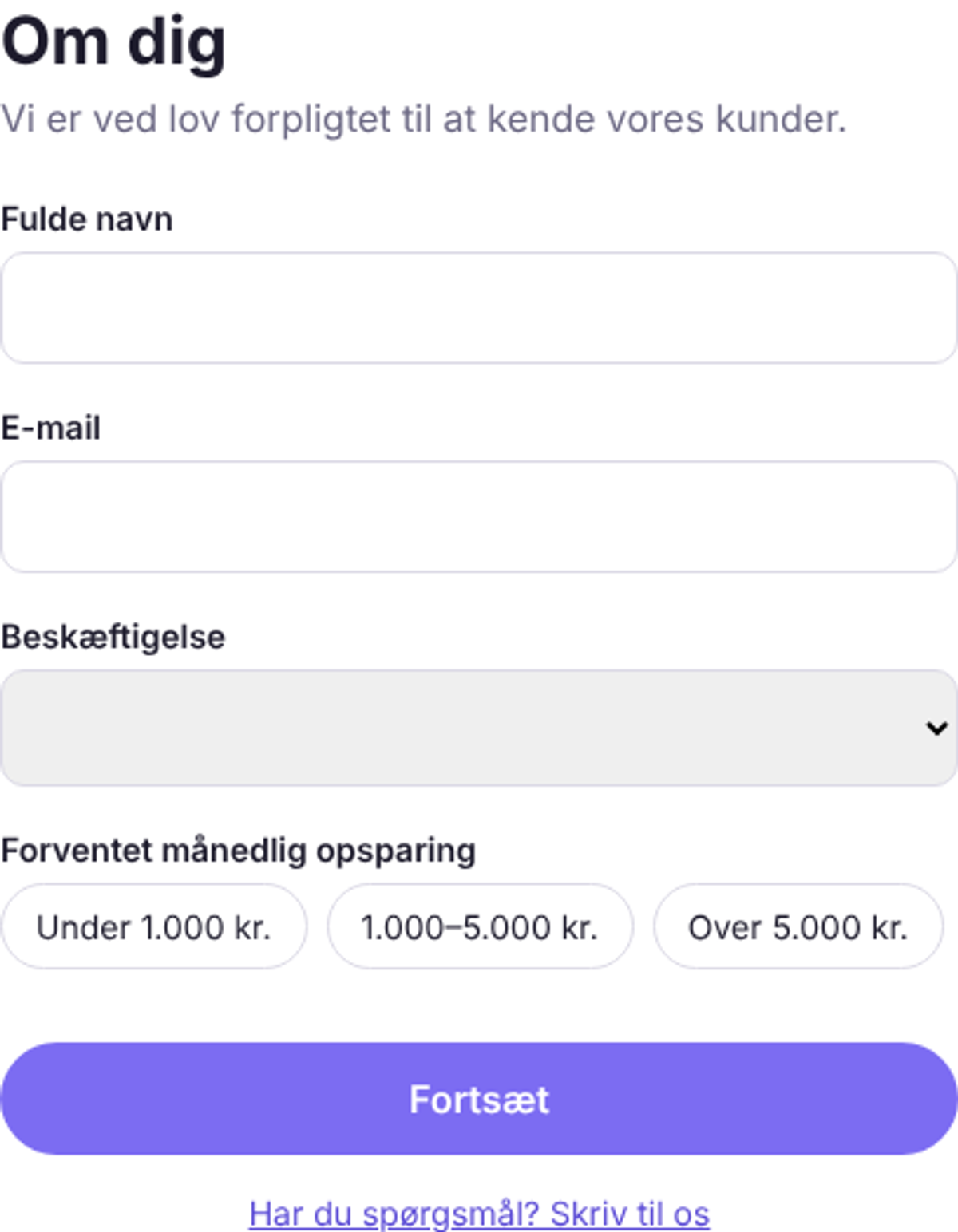
The three amount options are <span> chips with click handlers. They aren't focusable, have no role or selected state, and the question isn't tied to them. The field is required, so the user is stuck at “Udfyld alle felter.”.
Fix
Use native radios styled as chips.
<fieldset class="chips">
  <legend>Forventet månedlig opsparing</legend>
  <label class="chip"><input type="radio" name="amount" value="lt1000" required> Under 1.000 kr.</label>
  …
</fieldset>
Sign-up step 2 with name, e-mail, occupation and three rounded chips for monthly savings amount.
Evidence for MY-002

MY-004 · “Vilkår” dialog (sign-up) and “Skift regel” dialog (dashboard)

Dialogs don't take focus, can't be closed with Escape, and lose focus on close

High Effort M Not flagged by axe 2.4.32.1.14.1.2

Who it affects
Keyboard and screen reader users
What happens
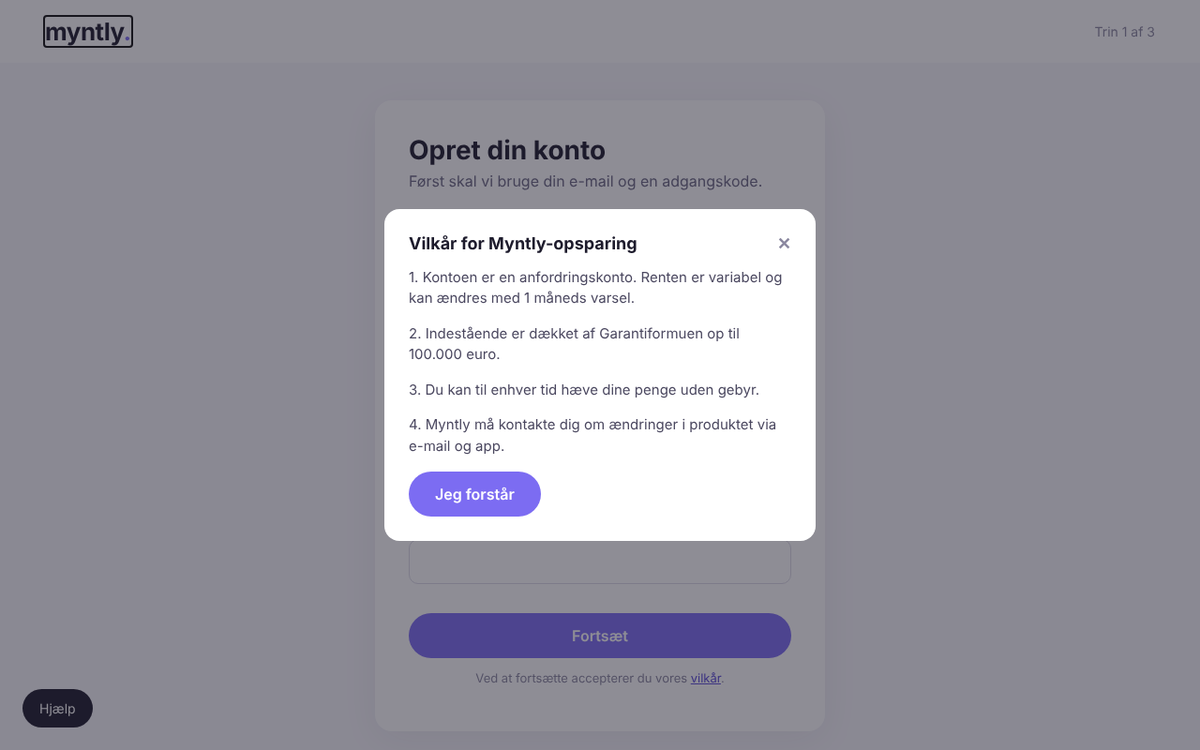
Opening “vilkår” leaves focus on the link behind the overlay. The dialog has no role or name, Escape does nothing, and the ✕ is a 15 × 21 px <span> that can't be focused. Tab moves into the dialog and then straight out to the page behind. After “Jeg forstår”, focus stays on the hidden button instead of returning to the link.
Fix
Use the native <dialog> element with showModal(). It handles focus, Escape and the inert background.
<dialog id="terms" aria-labelledby="terms-h">
  <h2 id="terms-h">Vilkår for Myntly-opsparing</h2> …
  <form method="dialog"><button>Jeg forstår</button></form>
</dialog>
<script>link.onclick = e => { e.preventDefault(); terms.showModal(); };</script>
Terms dialog open over the sign-up form. The close icon is a small ✕ in the top right corner.
Evidence for MY-004

Fix first

The top five fixes.

Ordered by impact on the journeys, then by effort.

  1. MY-001Remove the image CAPTCHA; use invisible bot checks and rate limitingEffort M
  2. MY-002Rebuild the savings amount chips as a radio groupEffort S
  3. MY-003Allow paste and password managers on all sign-up fieldsEffort S
  4. MY-004Use the native <dialog> element for both dialogsEffort M
  5. MY-005Tie password rules and errors to the fields and announce themEffort S

All findings

All 12 issues.

2 blockers, 4 high, 6 medium and 0 low. The full report also has steps to reproduce, the WCAG and EN 301 549 mapping and a draft accessibility statement.

  • MY-001Image CAPTCHA blocks blind and low-vision applicantsBlockerPartly flagged by axe
  • MY-002Savings amount can't be chosen without a mouseBlockerNot flagged by axe
  • MY-003Paste is blocked in the password and repeat e-mail fieldsHighNot flagged by axe
  • MY-004Dialogs don't take focus, can't be closed with Escape, and lose focus on closeHighNot flagged by axe
  • MY-005Password rules vanish and errors aren't tied to fieldsHighNot flagged by axe
  • MY-006Landing page and dashboard don't reflow at 320 pxHighNot flagged by axe
  • MY-007E-mail is asked for three timesMediumNot flagged by axe
  • MY-008Savings chart has no text alternative and relies on colourMediumNot flagged by axe
  • MY-009Primary buttons and secondary text fail contrastMediumFlagged by axe
  • MY-010“Saved” confirmation and goal progress aren't exposedMediumNot flagged by axe
  • MY-011Show-password button has no nameMediumFlagged by axe
  • MY-012Sign-up steps share one page titleMediumNot flagged by axe

Your site

Can every customer finish your checkout?

A founding-client audit is 9,900 DKK for two key journeys. Ask us for the full sample report by email.