LK-001 · Colour picker on all product pages
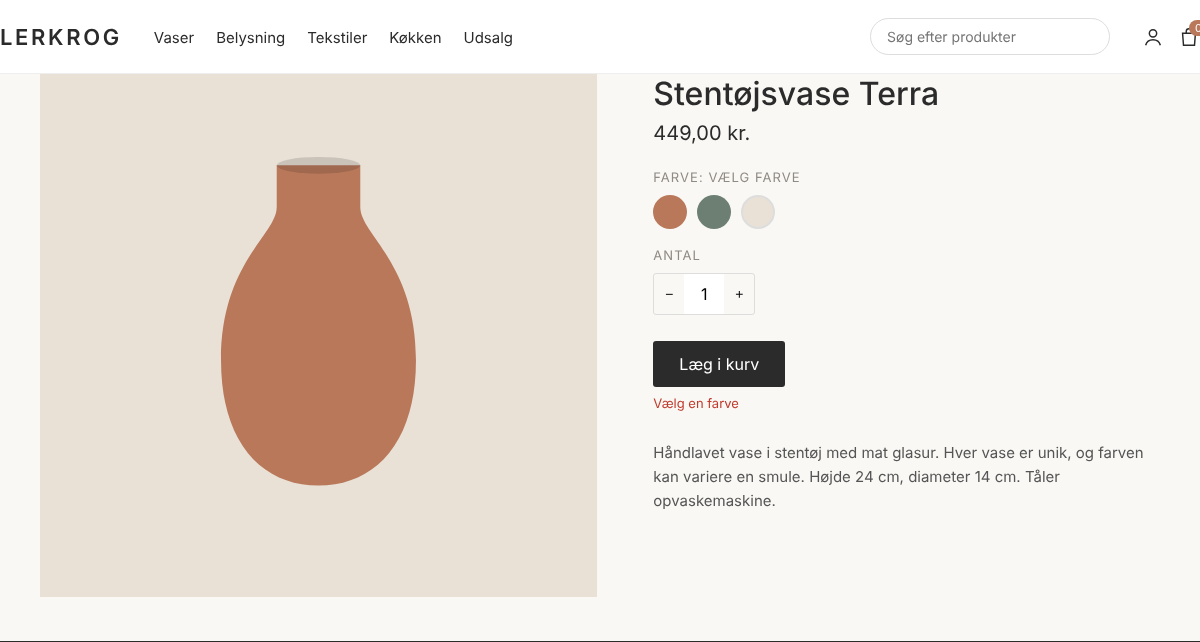
Colour swatches can't be reached or chosen without a mouse
Blocker Effort M Not flagged by axe 2.1.14.1.2
- Who it affects
- Keyboard users, screen reader users, switch and voice control users
- What happens
- The three colour swatches are plain <div> elements with a click handler. They are not in the tab order and do not appear in the accessibility tree at all. Choosing a colour is required, so pressing “Læg i kurv” only shows “Vælg en farve”, which is not announced either.
- Fix
- Use a native radio group and style the radio as the swatch. This gives keyboard support, a name, the selected state and grouping for free.
<fieldset class="swatches">
  <legend>Farve</legend>
  <label class="swatch" style="--c:#b9785a">
    <input type="radio" name="farve" value="terrakotta" required>
    <span class="visually-hidden">Terrakotta</span>
  </label>
  <!-- Mosgrøn, Kalk ... -->
</fieldset>